

Instagram Comment Generator
Instantly create realistic Instagram comment screenshots for your social media marketing, presentations, and creative projects.
Single Mode
Edit a single comment with full customization.
Number of replies to display
How to Use the Instagram Comment Generator
Our Instagram comment generator is a professional tool for creating authentic fake Instagram comment screenshots. Follow this simple guide to create your own Instagram comment mockups.
Interface Overview
When you open the tool, you'll see the main interface with two key areas: the Preview Area (showing your Instagram comment mockup in real-time) and the Configuration Panel (where you customize all the details including profile, comment text, and styles).
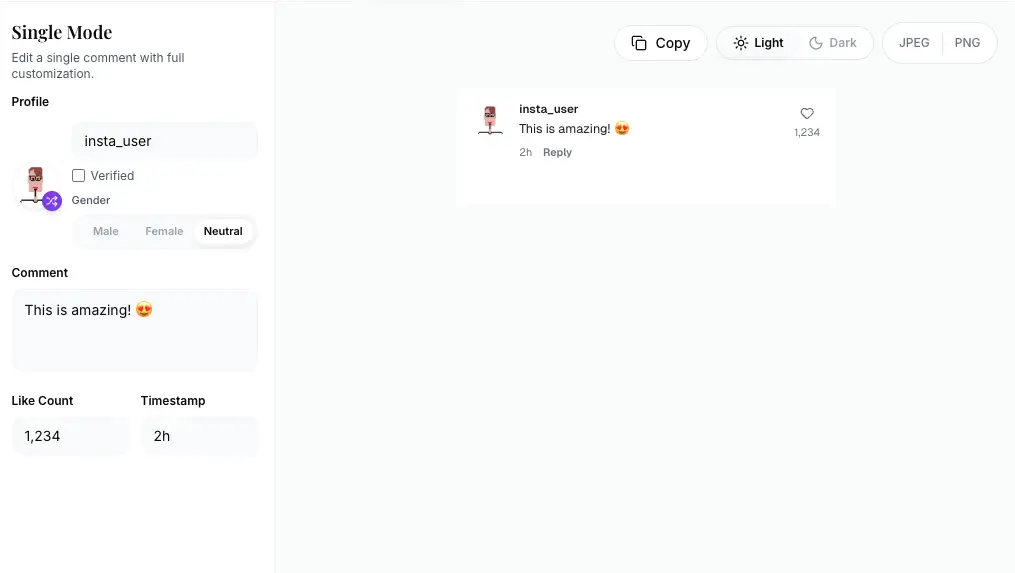
Configure Profile Settings
In the Profile section, customize your fake Instagram comment with the following options:
- Avatar Image:Click "Random avatar" to generate a profile picture, or upload your own custom avatar
- Display Name:Enter the username that will appear on the comment (e.g., "insta_user")
- Verified Badge:Enable to add the blue verified checkmark for official accounts
- Gender:Select Male, Female, or Neutral for random avatar style
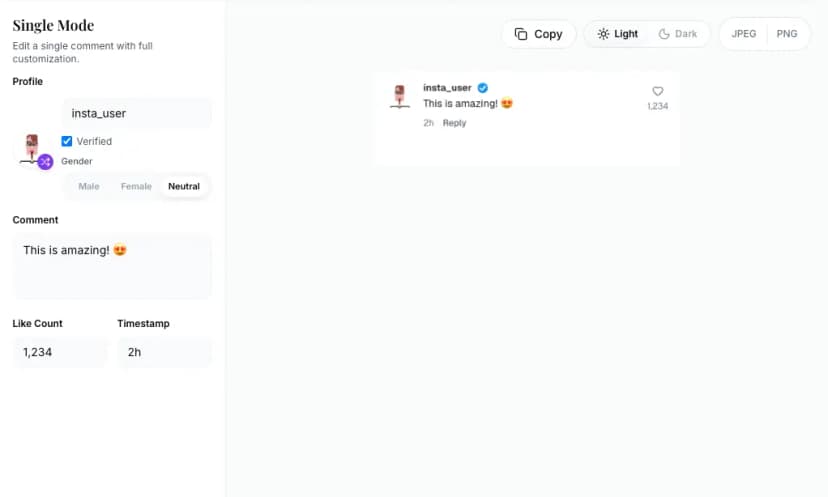
Customize Comment Content
Enter your comment text in the "What did they say?" field. The Instagram comment creator supports:
- Emoji expressions for authentic Instagram comments
- Multiple languages and special characters
- Customizable like counts with formatting (e.g., "1,234", "10.5K")
- Timestamp settings (e.g., "2h", "1d", "3w" for realistic timing)
Select Theme Style
Switch to the Styles tab and choose between:
Light Mode
Clean white background perfect for daytime content and bright presentations
Dark Mode
Instagram's dark theme for nighttime scenarios and modern designs
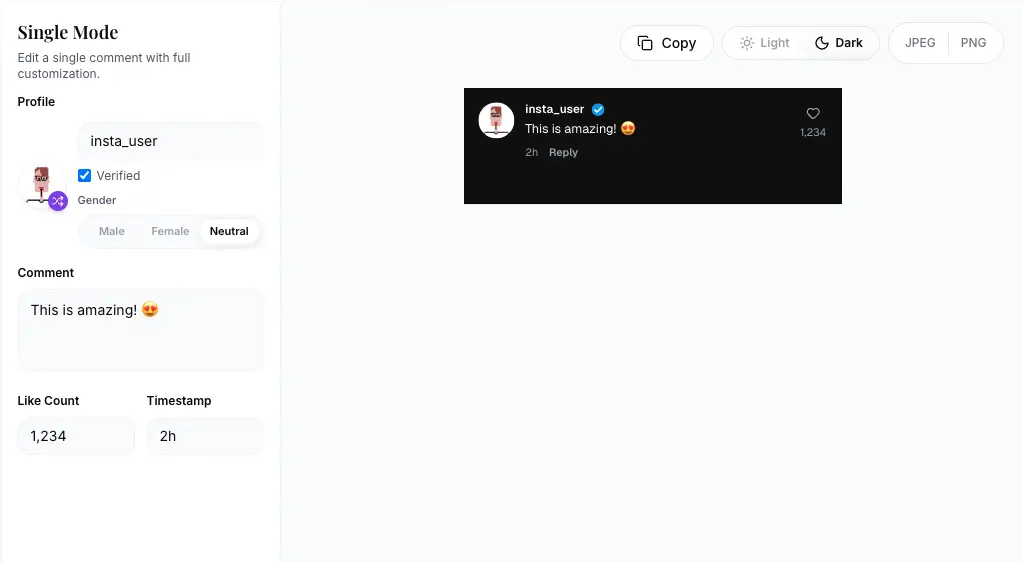
Export Your Instagram Comment Screenshot
Once you're satisfied with your Instagram comment mockup, export it using the buttons at the bottom:
Copy to Clipboard
Instantly copy your generated Instagram comment image for quick pasting
Download Files
Export as JPEG (smaller files) or PNG (high quality with transparency)
What You Can Create
With our Instagram comment generator, you can create:
Light Mode Comments
- ✓ Clean white background for professional presentations
- ✓ Perfect for bright-themed social media content
- ✓ Ideal for marketing materials and pitch decks
Dark Mode Comments
- ✓ Instagram's authentic dark theme styling
- ✓ Great for modern design mockups
- ✓ Perfect for nighttime scenario demonstrations
Note: Our Instagram comment generator creates realistic mockups for presentations, design prototypes, and educational purposes. No Photoshop or design skills required. Perfect for marketers, content creators, and designers who need quick Instagram comment screenshots.
Features
Live preview editing
See your Instagram comment mockup update instantly as you edit.
Verified badge + avatars
Add profile images and verification badges that match Instagram's UI.
Export-ready files
Download clean PNG or JPEG images for presentations and content.
Why Use Our Instagram Comment Generator?
Unlike basic photo editors or generic mockup tools, our Instagram comment generator is built to match the exact Instagram UI design. Whether you are a content creator, social media manager, or designer, this tool helps you visualize engagement scenarios without posting to your actual Instagram account.
Pixel-Perfect Design
Matches the exact font family, spacing, and visual hierarchy used in the official Instagram mobile app. Our rendering ensures authentic-looking comments down to the smallest details.
Verified Badge Support
Add the official blue checkmark verification badge to simulate comments from verified accounts, influencers, or brands with a single click.
Dark Mode Ready
Switch between light and dark themes instantly using Instagram's exact color palette and contrast ratios for authentic mockups in any context.
Professional Features for Every Use Case
Customize usernames, avatars, and comment text with full emoji support
Adjust like counts and timestamps for realistic engagement scenarios
Export high-resolution images for print, video, and digital presentations
Real-time preview updates for instant feedback and rapid iteration
What Can You Do with Instagram Comment Generator?
Social Media Marketing
Create compelling Instagram comment mockups to showcase customer testimonials and social proof in campaigns.
Content Creation
Generate fake Instagram comments for video content, memes, and creative storytelling projects.
Educational Materials
Develop training resources and digital literacy courses using realistic Instagram comment screenshots.
Design & Prototyping
Build UI/UX mockups and design portfolios with authentic-looking Instagram comment interfaces.
FAQ
Everything you need to know about our Instagram comment generator
Is the Instagram Comment Generator free to use?
Yes, this Instagram comment screenshot maker is completely free to use with no registration, subscription fees, or hidden costs. Generate unlimited comment mockups and download high-resolution images without any watermarks.
Do the generated Instagram comments look real?
Yes, this Instagram comment mockup tool carefully replicates Instagram's official design, typography, spacing, and layout to create realistic comment screenshots that match the authentic Instagram mobile app interface.
Can I use custom profile pictures in my Instagram comments?
Absolutely! You can upload your own avatars or use the random avatar generator to create diverse Instagram comment profiles. The tool supports custom images for fully personalized mockups.
Can I create Instagram comments in dark mode?
Yes, this tool fully supports both Instagram's light mode and dark mode themes for your comment screenshots. Switch between themes instantly to match your design context.
What image formats are supported for export?
The Instagram comment image generator supports both JPEG (for smaller file sizes and web use) and PNG (for higher quality with transparency support) export formats, optimized for digital and print use.
Can I customize verified badges and engagement metrics?
Yes! The Instagram comment generator provides complete control over verified badges, like counts, timestamps, and all visual elements to create any scenario you need for your mockups.